Back in 2022, VMware Cloud Director 10.3.1 introduced API Tokens. This allows a user the ability to generate API tokens for programmatic access to VMware Cloud Director. An automation script or 3rd-party solution can then use the API token to make API requests to Cloud Director on behalf of the user. This is especially useful for those that are looking at automating their VMware Cloud Director solutions via Terraform, as the API token can use used as opposed to a user name / password combination, making it a bit more secure.
So – how to you actually create an API token?
First, log into your VMware Cloud director tenant portal. In my case I’m using a virtual data center provisioned in IBM Cloud for VMware Solutions Shared.
Once logged in, click on your name in the upper right corner of the console and select User Preferences.
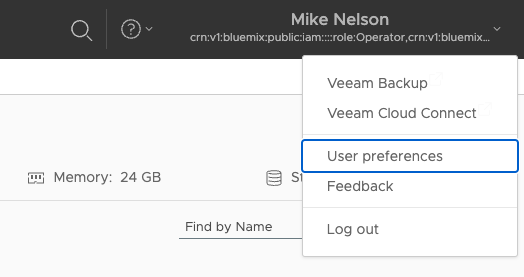
The user preferences page will appear. From there scroll down if needed until you see the section labeled API Tokens. Click on NEW under this heading to create a new token.

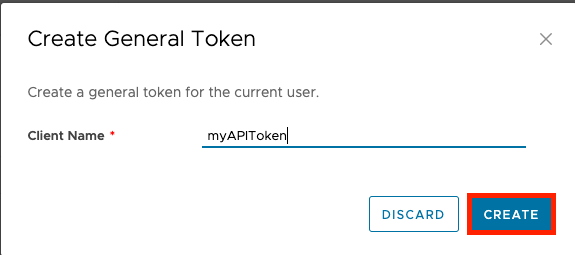
Give your new API token a friendly name and click CREATE. In the example below myAPIToken is used.
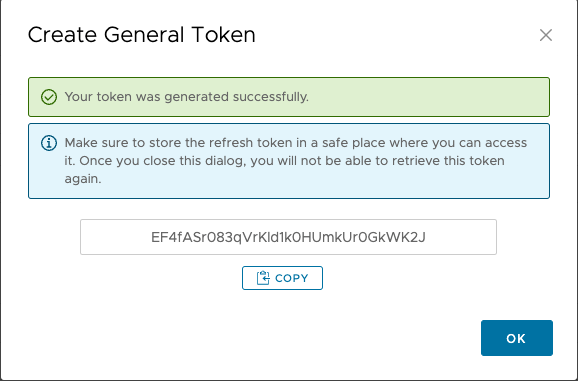
Your new API token will be displayed. Note that this is only displayed once, if you lose or forget the token you will need to create a new one.
Note that API tokens ever expire, so if one is lost or stolen it should be revoked immediately. To revoke an API token navigate to the user preferences page and click on the ellipses next to the token you wish to remove and click revoke.

You will get a warning that the token will be permanently removed. Click revoke to complete the operation.
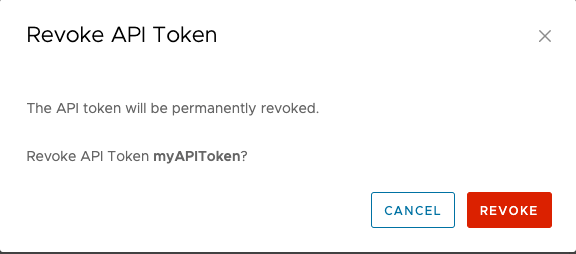
The API token will be immediately revoked.


 Virtual Musings
Leave a comment