VMware Cloud Foundation 5.2 has new features across the board. From SDDC Manager, to vSAN and NSX, even HCX and the Aria Suite have some really cool new features I’m looking forward to trying out in the lab to be able to deploy to my clients.
Out of all of the new things coming out – here’s my personal top five coolest new features in VMware Cloud Foundation 5.2:
1. Transitioning existing vSphere to VCF
One of the roadblocks to many clients deploying VCF has been the need for a greenfield environment. That takes money to spin up new hardware, and the time to get it ready for VCF. With VCF 5.2 you’ll be able to take existing clusters and bring them into VCF, meaning no longer do you have to start over from scratch. And the best part is you can do both import and conversion. You can take an existing cluster and by deploying SDDC Manager convert it into a Management Domain. You can also import existing vSphere clusters into a VCF instance and make them workload domains. Meaning you don’t need to start everything from step zero anymore to get the full benefits of VCF.

2. Offline Patch Repos
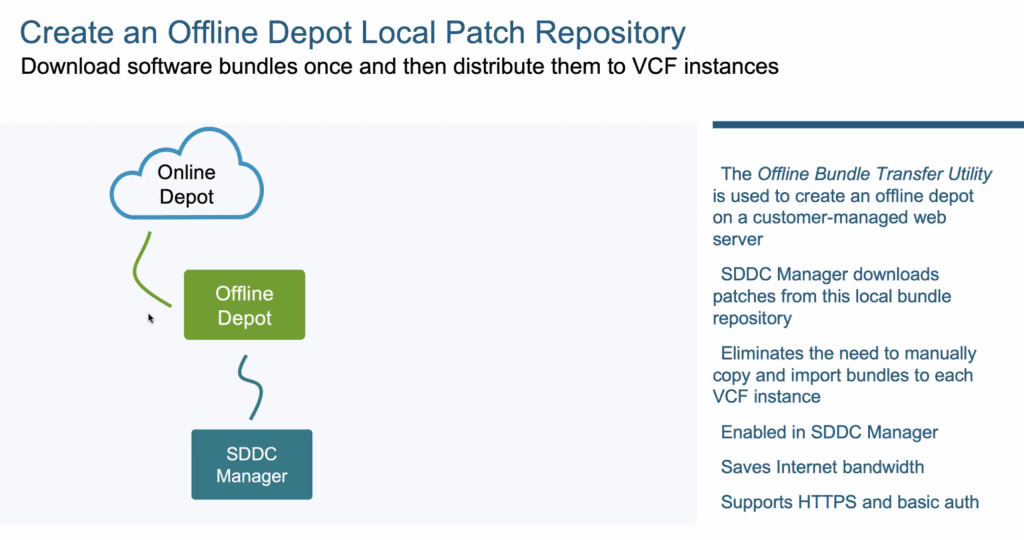
I work in a lot of regulated environments, and with clients that in no circumstance want their systems directly connected to the Internet. They prefer not even having proxy servers. For years vSphere has had the ability to have an offline repo for updates, and now that functionality has been brought to VCF. Especially with my work on IBM Cloud – I can now spin up a small virtual instance running a web server and use that to pull down the updates, ensuring security and isolation. Then every VCF instance in the environment can use that repository. Saves time, make it more secure, basically everything I’d want to be able to do. Let’s be honest it’s not the most flashy functionality, but is a great step forward in Day 2 operations.
3. vSAN Performance Troubleshooting
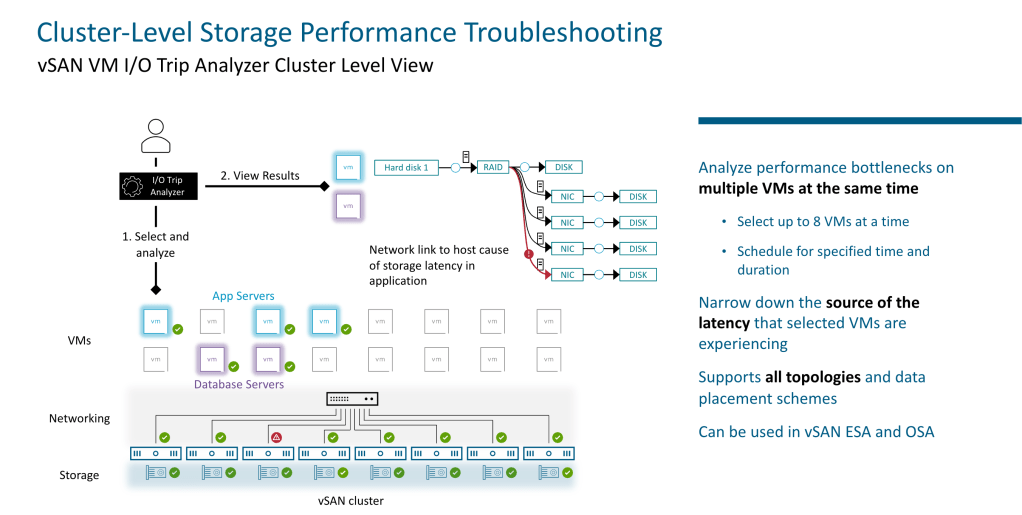
So the great thing about vSAN is that no longer do I as admin have to wait on the storage team to give me a LUN or an NFS mount if I need more storage or some other change. It’s under my control as part of VCF. The downside, of course, is that when something isn’t performing as needed I’ve also got the responsibility of fixing it. With vSAN 8 U3 which is part of VCF 5.2 I’m able now to measure performance of multiple virtual machines at the same time. This means I can take a full application (up to 8 virtual machines) and do an I/O analysis and find exactly what an where the performance bottleneck is occurring. Or, be able to show it’s not the infrastructure but somewhere else. Really cool stuff and super useful.
4. Edge TEP Groups
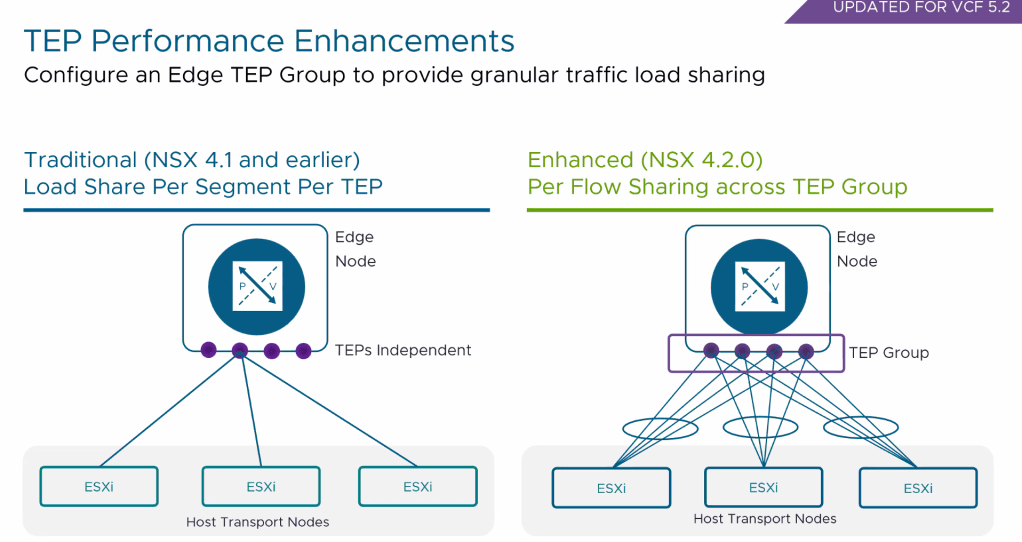
One of the bottlenecks you can experience in NSX is the communication between your ESXi hosts and your edge nodes. In NSX 4.1 and earlier, this was a single path based upon the segment, and since the typical design is that these share a segment that meant you could have all the traffic from a cluster of ESXi hosts going to a single TEP, making that the bottleneck in your software defined network. With NSX 4.2.0, VMware has added a new feature called TEP groups, meaning you can have multiple TEP’s servicing traffic from multiple hosts. Instead of per segment, now the granularity for load sharing is per flow, meaning better scalability and performance.
5. HCX Configurable Transport Encryption
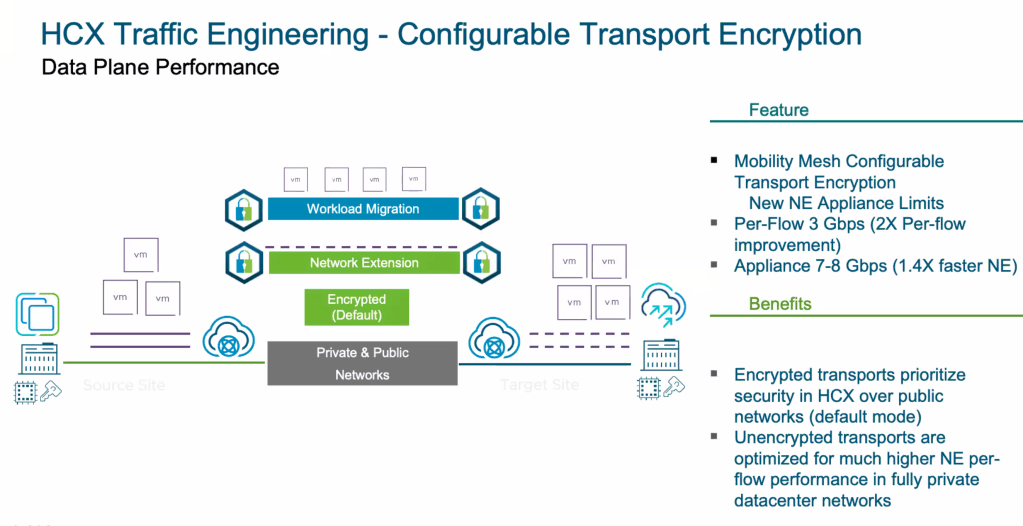
Security is good, and needed. But what if you are doing a migration from say an old vSphere 6.7 instance to vSphere 8 and want to use HCX to assist in the migration? And this is occurring inside your datacenter? Well with HCX 4.10 you’ll be able to decide if that flow needs to be encrypted or not, meaning you can turn it off when the flow is already encrypted by something else, or simply does not need encryption due to being a secure network. The benefits are huge – 2x per-flow improvement on network extensions an appliances can now handle 7-8 Gbps, which is a 1.4x improvement than before. It still defaults to secure, as it should, but being able to turn it off when it’s safe is a great improvement.
I’m literally just scratching the surface here of all the new features. Support for Entra ID, centralized license management, and vSAN data protection are just a few that didn’t make my top 5 but may make yours. So if you have adopted VCF, or are thinking about it, take a look at all the information at https://core.vmware.com and how you can take advantage of these great additions to the product stack.


 Virtual Musings
Leave a comment